
Design: Lenovo’s watchband hinge is still the best
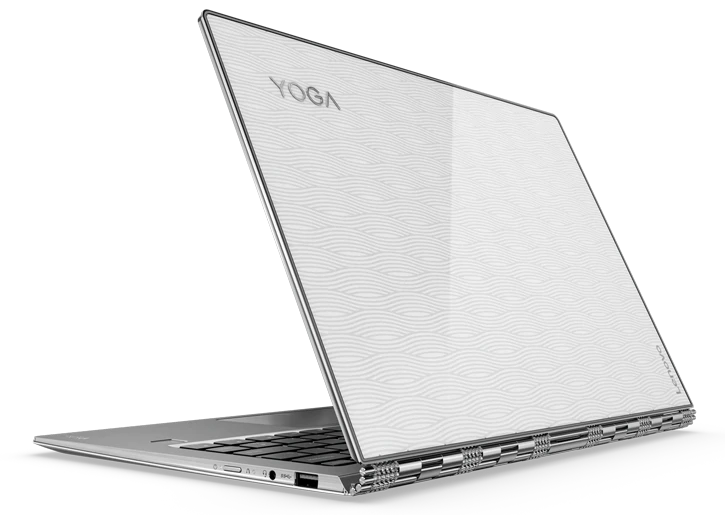
Lenovo Yoga 910 Review, From the outside, the 910 doesn’t look much different from last year’s Yoga, but that’s not a bad thing. It has smooth, brushed-metal panels on the top and bottom; shiny, polished metal sides; and, of course, Lenovo’s signature watchband hinge holding everything together. It’s a classy, sophisticated look that puts the Yoga 910 on the short list of the best-looking laptops on the market.
 Inside, the Yoga 910’s appearance has gotten a pretty dramatic face-lift, with a new display featuring tiny 6-millimeter-wide bezels. This nearly bezel-less design makes the screen seem like it’s floating in midair and helps the Yoga draw you in even more when you’re watching movies and TV.
But I do have one complaint: The body panels tended to creak when I picked up the 2-in-1. Although the Yoga 910 never felt flimsy, I wish its build quality felt a bit sturdier.
The Yoga 910 is slightly larger and heavier than its main rival, the HP Spectre x360, but not so much so that it would ever stop you from putting it in the same size bag. It measures 12.72 x 8.84 x 0.56 inches and weighs 3.04 pounds, compared with the Spectre x360’s 12.03 x 8.58 x 0.54 inches and 2.8 pounds.
Specs
| CPU | 2.7-GHz Intel Core i7-7500U |
|---|---|
| Operating System | Windows 10 Home |
| RAM | 8GB |
| RAM Upgradable to | 16GB |
| Hard Drive Size | 256GB |
Display: Now with even more screen to love
Another benefit of the Yoga 910’s smaller-bezel design is that it allowed Lenovo to include a 13.9-inch display versus the 13.3-inch screen you’d normally get on a system this size. This results in a screen that’s almost 10 percent larger than those on 13.3-inch systems. Although some people may not be huge fans of the 910’s somewhat ungainly lower chin, I quickly forgot about that unsightly design choice after checking out the 910’s big, colorful screen.

When I watched the trailer for Guardians of the Galaxy Vol. 2 on the Yoga 910’s full-HD panel, I loved the way the bright, ruby-red eyes of Star-Lord’s mask shone out from the darkness.
At 292 nits, our Yoga 910 review unit’s screen was pretty bright, but it was dimmer than its main competitor, the HP Spectre x360, which put out 318 nits. The Yoga 910’s color-reproduction range is quite similar to the Spectre x360’s range of 101.7 percent; it was almost impossible to note a difference between the two when they were compared side by side.
Keyboard and Touchpad: Quick and responsive
While the Yoga 910’s backlit keyboard sports a somewhat shallow travel distance of 1.3 millimeters, it’s balanced out nicely by a relatively stiff 65 grams of actuation weight required to depress the keys. This gives you a pretty snappy typing experience; I had no trouble hitting my typical 75 words per minute on my first try.
 The 910’s 4.7 x 2.3-inch one-piece touchpad is pretty good, too. There’s more than enough room to mouse around, and it responded to left and right clicks and multitouch gestures, such as pinch-to-zoom, without hesitation.
Performance: Potent 7th-gen speed
Featuring a 2.7-GHz Intel Core i7 7500U CPU, 8GB of RAM and a 256GB PCIe solid-state drive, our $1,200 Yoga 910 review unit was never hurting for power. Even when the Yoga 910 had upward of 15 tabs open in Chrome and a couple of HD YouTube streams playing in the background, I didn’t notice a hint of lag. I just wish the storage speed were a little faster.
 On Geekbench 4, which evaluates overall performance, the Yoga 910’s score of 8,102 was quite impressive. The Spectre x360 (which also has a Core i7-7500U CPU) performed marginally better, with a score of 8,147.
When we duplicated 4.97GB of mixed media files, the Yoga 910’s SSD posted a transfer speed of 195.7 MBps. Although that’s fast enough to top the 171.1-MBps average for ultraportables, other premium 2-in-1s, such as the HP Spectre x360 and the Microsoft Surface Book, which both posted even faster speeds of 318 MBps.
Lenovo Yoga 910 Review, Audio: Fine, but could be better
The Yoga 910’s two bottom-mounted JBL speakers are pretty decent, and can easily fill a room with sound. However, compared with the quad-speaker Spectre x360, the Yoga 910’s mids and highs sounded shallower, and its bass didn’t have nearly the same kind of punch as I heard on the HP.
Lenovo Yoga 910 Review, Ports: Two flavors of USB
The Yoga 910 features an older USB Type-A port as well as two USB 3.0 Type-C ports. One Type-C port supports video-out, while the other sports always-on charging for keeping devices like smartphones and smartwatches topped off. There’s also a standard headphone/mic jack, as well as a built-in fingerprint reader, which you can use to sign in to Windows or other services.
 Unfortunately, the Yoga 910 doesn’t support Thunderbolt 3, which means data transfers won’t be as quick, and you won’t be able to connect the Yoga 910 to a dock with a single cord if you want data, video and power all sent over one connection. I also wish Lenovo had included an SD card slot of some sort, because without one, it’s kind of a pain to transfer images from a camera to the laptop.
Lenovo Yoga 910 Review, Battery Life: How does an extra 2.5 hours sound?
One of the best things about the Yoga 910 is its significantly improved battery life, which, for a system that already lasted pretty long, is a welcome addition. On the Laptop Mag Battery Test (continuous web surfing over Wi-Fi), the Yoga 910 lasted 10 hours and 36 minutes.
That’s 2.5 hours more than last year’s Yoga 900 (7:57), and nearly 2 hours longer than the Yoga 900S (8:46). Compared to the Yoga 910, the HP Spectre’s battery life is still pretty good, but about half an hour shorter, at 10:08.
Lenovo Yoga 910 Review, Webcam: A bit awkward
The Yoga 910 sports a pretty standard 720p webcam, but because of this system’s nearly bezel-free display, it’s located below the display instead of in a more typical top-mounted position. That puts viewers on the other end of a video in the awkward position of constantly looking up at the bottom of your chin, unless you train yourself to crane your neck down and look more directly at the camera. And that gets kind of painful pretty quickly.
Alternatively, you could use the Yoga 910 in tent or tablet modes when making video calls, but then you wouldn’t have access to the keyboard.
Thankfully, the camera’s image quality is pretty decent, though a little grainy at times. However, unlike on the HP Spectre x360, there’s no IR camera to let you log in using your face with Windows Hello.
Lenovo Yoga 910 Review, Heat: Well under control
Even though it’s just 0.6 inches thick, the Yoga 910 doesn’t get too hot during casual use. After it streamed HD video for 15 minutes, the hottest spot on the laptop, near the bottom vent, measured 97.5 degrees Fahrenheit. That’s slightly above our 95-degree comfort threshold.
On top, things were even cooler. The space between the G and H keys measured just 92 degrees, while the touchpad measured 86.5 degrees.
Availability and Configurations
 For the least expensive Yoga 910, you’ll want to check out Best Buy to get systems starting at $1,200 with an Intel Core i7 CPU, 8GB of RAM and a 256GB SSD. However, if you want to upgrade to the optional 4K display, you’ll need to pony up at least $1,430 on Lenovo.com.
Bottom Line
Lenovo Yoga 910 Review, The Yoga 910 is the cream of the 2-in-1 crop. It gives you the latest Intel Core i7, a fairly big 13.9-inch screen in a compact body, and more than 10 hours of battery life. Add in what is still the best hinge in the business, and you have an irresistible 2-in-1 starting at just $1,200. The only real downside of the Yoga 910 is its awkward webcam placement.
The Yoga 910 does have a worthy competitor, though: HP’s Spectre x360 is even lighter, and it has better speakers, Thunderbolt 3 and nearly the same amount of battery life. It also has a lower starting price of $1,050.
The choice really comes down to how much you value the Yoga 910’s slightly larger 13.9-inch display, the option of a 4K screen (which the Spectre x360 doesn’t offer) and its upscale design with a bezel-free screen and watchband hinge. If you go Lenovo’s way, the Yoga 910 will not disappoint you.
-
Pros /
Gorgeous, nearly bezel-free 13.9-inch display; Watchband hinge is still the best-looking available ; Intel 7th-gen CPU; Snappy keyboard; Strong battery life
-
Cons /
Awkward webcam location; No SD card slot or Thunderbolt 3
-
Verdict /
Lenovo’s Yoga 910 pushes the limits of premium 2-in-1s, thanks to its nearly bezel-free display, speedy 7th-gen Intel CPU and more than 10 hours of battery life.