

But what if we want to display an AdSense ad in the middle of a post?
How to add adsense ads below post title middle post inside the post?We can manipulate the location of the ads to be displayed by adding a script inside the template and using a tag inside our post to where we want the AdSense ad to appear. Once added, we can place the ads anywhere, be it between paragraphs or in the middle of the content etc.
How to add adsense ads below post title middle post inside the post? Manually inserting AdSense ads in the middle of posts in Blogger is pretty easy, just follow these steps below:
Adding Adsense Ads In the Middle or Anywhere inside Blogger Posts
Before proceeding, it is recommended to backup your template: go to “Template” and click on the “Backup/restore” button to save a copy on your hard drive.
Adding the script
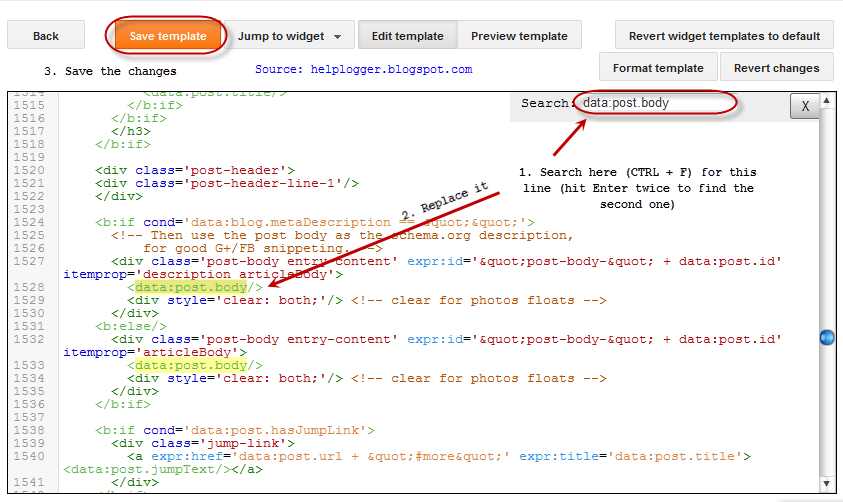
Step 1. First thing we need to do is to parse the AdSense code and convert it to plain text. Then go to “Template”, click on the “Edit HTML” button and click anywhere inside the code area to search using CTRL + F keys for this tag:
<data:post.body/>
Note: you may find it several times, but we need to stop at the second one. Or, if you can’t see any changes, test the third one.
Step 2. Replace <data:post.body/> with this code:
<div expr:id=’”adsmiddle1″ + data:post.id’></div>
<b:if cond=’data:blog.pageType == “item”‘>
<b:if cond=’data:blog.pageType != "static_page"’>
<div style=”clear:both; margin:10px 0”>
<!– Add here the code of your ad –>
</div>
</b:if>
</b:if>
<div expr:id=’”adsmiddle2″ + data:post.id’>
<data:post.body/>
</div>
<script type=”text/javascript”>
var obj0=document.getElementById(“adsmiddle1<data:post.id/>”);
var obj1=document.getElementById(“adsmiddle2<data:post.id/>”);
var s=obj1.innerHTML;
var r=s.search(/\x3C!– adsense –\x3E/igm);
if(r>0) {obj0.innerHTML=s.substr(0,r);obj1.innerHTML=s.substr(r+16);}
</script>
Step 3. Add the converted Adsense code on where you see the <!– Add here the code of your ad –> annotation, then save the changes by clicking on the “Save template” button.
Note: For centering the ads, add the <center></center> tags before and after the AdSense code, like this:
<div style=”clear:both; margin:10px 0″>
<center>
<!– Add here the code of your ad –>
</center>
</div>
Adding the AdSense annotation to display the ad
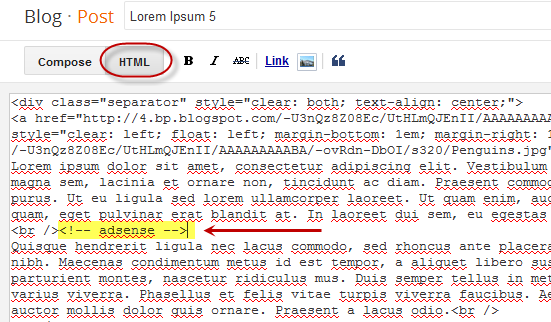
Step 4. When you create a New Post, add this annotation inside the “HTML” section to where you want the Google AdSense ads to appear:
<!– adsense –>
For example:
This is a demo text. This is a demo text. This is a demo text. This is a demo text. This is a demo text. This is a demo text. This is a demo text. This is a demo text. This is a demo text. This is a demo text.<br /><br />
<!– adsense –>This is a demo text. This is a demo text. This is a demo text. This is a demo text. This is a demo text. This is a demo text. This is a demo text. This is a demo text. This is a demo text. This is a demo text.
|
| AdSense annotation in the middle of the post content |
How to add adsense ads below post title middle post inside the post? Please note that if you don’t add this annotation to specify where to display the ad, then it will appear below the title by default.
So this is how we can add AdSense ads in the middle or anywhere inside our Blogger posts. Don’t worry about violating the Google’s Terms of Service because applying this method will not modify the ad’ structure.