
The average fees for the faculties are set out in the tables at the bottom of this page and are based on the average cost of the study programme, excluding AIM modules. We will update the web with the new fee structure the moment it becomes available (normally at year-end).
The initial fee, payable before registration is possible, is displayed at the Summary of Fees icon. It will be visible towards the end of December (preceding the January registration period) on the student’s account.
Once students are registered, their own specific student account details and information about possible rebates can be found on the UP Student Portal “Student Centre”. According to our policy, 50% of a student’s account is payable end of April. Accounts are fully payable by 31 July. Also, see the 2,5% Discount and Payment Arrangements icons for handy information.
- See the Statement of Accounts icon for information on where and how to view the account.
- Non-South African citizens please refer to notes available at the International Fees icon.
- Fees do not include the cost of prescribed books, stationery or other study-related expenses.
- If a degree is completed mid-year, AND a new degree is registered for in the same year thereafter, the FULL tuition fees are immediately payable on registration. Full fees are payable by end July of any study year, irrespective of when in the year the programme was registered for. Any amounts still outstanding after 31 July, will result in the blocking of access to academic records. Notification of a supplementary exam will not be blocked and will be available to the student.
NOTE: Pay the initial fee early.
During the January registration period, the queues at the UP cashiers are excessively long, and may delay your progress for hours. Avoid these long payment queues during the registration period by paying the initial fee directly into the University’s bank account, at least 5 DAYS BEFORE your registration date. See the Bank Details icon for our account number, etc.
- This will allow for adequate processing time in this very busy time of the year and will ensure that you are not financially blocked which will prevent you from registering.
- Submit proof of any bursary to the Student Service Centre ([email protected] ) preferably two weeks before registration, so that UP can record it in the system, and if applicable, waive the payment of the initial fee. See the Fees paid by Bursaries icon for more information.
- Keep your proof of your payment (or copy of your bursary letter) with you during the registration period.
No student may register before they have either:
– paid the initial fee AT LEAST 5 DAYS BEFORE registration
or
– provided proof of a bursary/loan from an external provider AT LEAST 5 DAYS BEFORE registration
AIM Modules
The cost of AIM modules is not included in the average cost per course in the Fees tables below.
AIM 101
AIM 102
AIM 111
AIM 121
Estimated tuition fees per year (SA and SADC countries citizens)
Once an applicant has registered at the University, a detailed statement of tuition fees will be made available on the Student Portal. See the Statement of Accounts icon for details.
Tuition fee quotations are available to students as a self-help function. Please see the Quotation icon for more information.
Please consult the faculty yearbooks on the UP web for the module codes:
• On the UP web, click My TUKS login
• Login on the UP Student Portal
• Enter the Student Centre (self service)
• Click the Student Finances link under Finances, then Student Finances tab on the top of the next page and you will find the fee estimation – quotation option
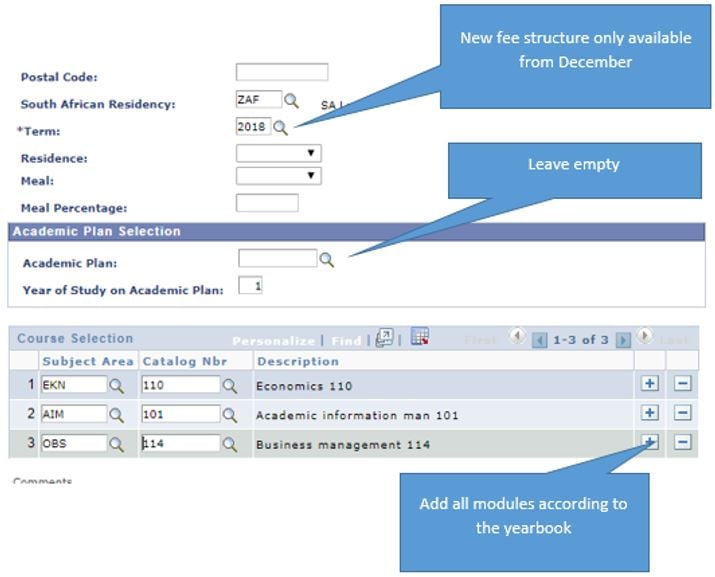
• The system will allow module selection option for all undergraduate students. See your faculty yearbook for codes. Example of a course selection option: Subject Area: EKN, Catalog Number: 110
• Remember to add AIM modules
• Complete the required fields
• Use the plus (+) button to add modules or the minus (-) button to remove modules
• Click the Generate Quote button to view, save or print the quotation (PDF format)
Please ensure your browser allows pop-ups
Example:
Fees in 2019
Please see below table or view the pdf version here