
Google AdSense is the most popular option for monetizing online content, but sadly enough, many bloggers don’t know how to create a Google Adsense account. Creating a AdSense account is very easy thing to do and for being accepted you just need a website or a blog indexed by Google, which should contain a minimum of 10 pages and most important, not violating Google Adsense policies.
Apply Account Approval

How to create Google Adsense Account Before anything else, you have to apply for a Google AdSense account. Just go to the AdSense homepage www.google.com/adsense and click on the “Sign up now” red button.
How to create Google Adsense Account Now you must complete the Adsense registration form:
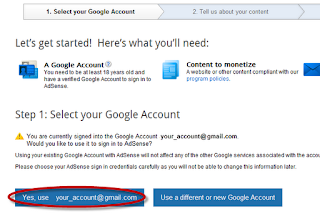
Step 1. Select your Google Account to continue
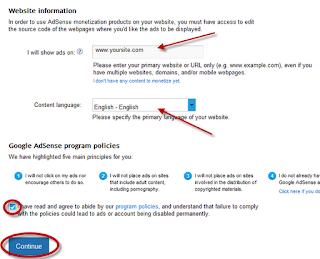
Step 2. Tell us about your content – enter your main website/blog URL where you want ads to be displayed, then select your website content language.
Read and pay attention to the Google AdSense policies because if you violate the rules, your account can be disabled later and unfortunately, you have small chances to get it back.
Rules:
1. I will not click on my ads nor encourage others to do so.
2. I will not place ads on sites that include adult content, including pornography.
3. I will not place ads on sites involved in the distribution of copyrighted materials.
4. I do not already have a Google AdSense account.
5. I will not place ads on sites that include incentives to click on ads.
Check “I have read and agree…” and then press “Continue”
Step 3. Submit your AdSense application: select your account type and enter your personal information (country, your real name, address, phone). These informations will be used when you will receive a payment. Next, press “Submit my application” to finish with the registration.
After submitting the form, Google will review your blog and your registration. Wait maximum 2 weeks to get your AdSense registration approved… or rejected. Google will send you an email to your inbox if your account has been approved.